
Times New Roman Font Generator
Times New Roman is a licensed serif typeface, not a Unicode block, so exact reproduction isn't possible through character substitution. The Mathematical Alphanumeric Symbols' bold serif style is the closest plain-text stand-in.
Use Bold for the closest classic serif weight, or Italic and Bold Italic for the slanted variants of the same look.
Bold20 characters
𝐓𝐢𝐦𝐞𝐬 𝐍𝐞𝐰 𝐑𝐨𝐦𝐚𝐧 𝐅𝐨𝐧𝐭
Italic20 characters
𝑇𝑖𝑚𝑒𝑠 𝑁𝑒𝑤 𝑅𝑜𝑚𝑎𝑛 𝐹𝑜𝑛𝑡
Bold Italic20 characters
𝑻𝒊𝒎𝒆𝒔 𝑵𝒆𝒘 𝑹𝒐𝒎𝒂𝒏 𝑭𝒐𝒏𝒕
Sans Serif20 characters
𝖳𝗂𝗆𝖾𝗌 𝖭𝖾𝗐 𝖱𝗈𝗆𝖺𝗇 𝖥𝗈𝗇𝗍
How It Works
Type your text, tap Copy on the style you like, then paste it anywhere — it's plain Unicode text, so it works everywhere. See the full walkthrough with screenshots.
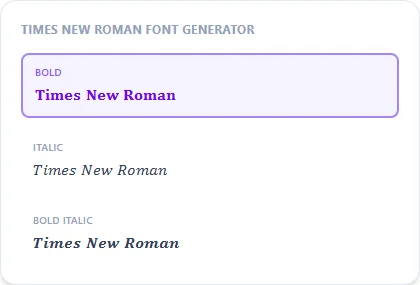
The closest available match, not an exact copy
Times New Roman was designed for The Times newspaper and later licensed as a system font. Its exact letterforms aren't part of the Unicode standard, so no plain-text generator can reproduce it pixel for pixel. Unicode's Mathematical Bold serif block is the nearest equivalent available as copy-pasteable text, matching the general weight and serif structure without being the identical typeface.
When a serif look helps a bio or post
A serif style reads as more formal, classic, or editorial than the sans-serif font most social apps use by default, useful for an announcement, a formal bio line, or anything that wants to feel a step more traditional than the platform's usual look.
Frequently Asked Questions
Is this the real Times New Roman font?
+
No, it's the closest serif-style Unicode block available. Times New Roman itself is a licensed font file that can't be reproduced through text substitution.
Why would I want serif text in a bio or caption?
+
A serif style reads as more formal or classic than a platform's default sans-serif font, useful for a more traditional-feeling bio or announcement.
Can I get the actual Times New Roman font instead?
+
Yes, it ships with most Windows, Office, and many design tool installs; use it directly from your system's font list for documents rather than a text generator.
Is serif text good for a formal announcement post?
+
Yes — Bold reads more traditional and buttoned-up than a platform's default sans-serif font, which suits an announcement or formal caption well.