
Instagram Fonts
Instagram doesn't let you change your font natively, so every 'Instagram font' you've seen in someone's bio is actually plain Unicode text styled to look different, exactly what this generator produces.
Type your bio text once to preview it across all styles, then copy whichever one fits and paste it straight into your Instagram profile.
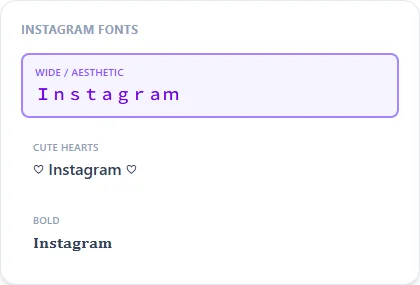
Wide / Aesthetic15 characters
Instagram Fonts
Cute Hearts19 characters
♡ Instagram Fonts ♡
Bold15 characters
𝐈𝐧𝐬𝐭𝐚𝐠𝐫𝐚𝐦 𝐅𝐨𝐧𝐭𝐬
Small Caps15 characters
ɪɴꜱᴛᴀɢʀᴀᴍ ꜰᴏɴᴛꜱ
Cursive Script15 characters
ℐ𝓃𝓈𝓉𝒶ℊ𝓇𝒶𝓂 ℱℴ𝓃𝓉𝓈
Italic15 characters
𝐼𝑛𝑠𝑡𝑎𝑔𝑟𝑎𝑚 𝐹𝑜𝑛𝑡𝑠
Bubble15 characters
Ⓘⓝⓢⓣⓐⓖⓡⓐⓜ Ⓕⓞⓝⓣⓢ
How It Works
Type your text, tap Copy on the style you like, then paste it anywhere — it's plain Unicode text, so it works everywhere. See the full walkthrough with screenshots.
Why some Instagram bios look like a different font
Instagram's app renders whatever text you give it in a single system font. There's no font picker anywhere in the settings. What people call an 'Instagram font' is actually plain text built from a different Unicode character block, made to look bold, cursive, or decorated. Because it's real text rather than an image, it displays identically whether the person viewing it is on iPhone, Android, or desktop web.
Bio vs. username vs. caption — where to use which style
Your @username has stricter character rules (Instagram limits it to a small set of Latin letters, numbers, periods, and underscores), so styled Unicode text usually won't save there. Your display name, bio, captions, and comments all accept full Unicode, which is where fancy fonts are actually used: Cute Hearts and Fullwidth are the most common bio picks, Bold and Small Caps read cleanest in a display name.
Frequently Asked Questions
Why doesn't Instagram let me pick a font directly?
+
Instagram's bio and caption fields only render the system font. There's no built-in font picker. Styled Unicode text is the workaround everyone uses instead.
Will a fancy font in my bio affect being found in Instagram search?
+
Instagram search matches on the underlying characters, and styled Unicode letters aren't treated as their plain-text equivalents — keep your @username in plain text and reserve styled fonts for the bio description.
What's the best font style for an Instagram name field?
+
Small Caps and Bold tend to display cleanest at the name-field size; Cursive Script can look great but is harder to read at very small sizes.
Do I need to log in to use this?
+
No login, no account, and nothing is stored — you type, you copy, you're done.
Can I generate fonts for Instagram comments too, not just my bio?
+
Yes, the output pastes the same way into comments, captions, DMs, and your bio.