
Snapchat Font Generator
Every style on this page actually displays on Snapchat. Effects that don't work (strikethrough, underline, zalgo, and anything else built from Unicode combining marks) are hidden, because Snapchat strips those marks before rendering and the result arrives as plain text. What you see in the generator is what you get when you paste it in.
Snapchat's bio allows up to 150 characters. Each styled letter counts as one character, the same as a plain letter, but wrapper symbols added around the text (the ✧ in Sparkle, or the ◆ in Diamond Bold) count toward that total too — the counter above the generator shows the real length so you can check before you copy.
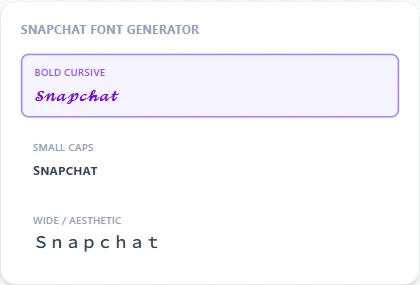
Bold Cursive13 characters
𝓢𝓷𝓪𝓹𝓬𝓱𝓪𝓽 𝓕𝓸𝓷𝓽
Small Caps13 characters
ꜱɴᴀᴘᴄʜᴀᴛ ꜰᴏɴᴛ
Wide / Aesthetic13 characters
Snapchat Font
Sparkle17 characters
✧ Snapchat Font ✧
Bold13 characters
𝐒𝐧𝐚𝐩𝐜𝐡𝐚𝐭 𝐅𝐨𝐧𝐭
Bubble Filled13 characters
🅢🅝🅐🅟🅒🅗🅐🅣 🅕🅞🅝🅣
How It Works
Type your text, tap Copy on the style you like, then paste it anywhere — it's plain Unicode text, so it works everywhere. See the full walkthrough with screenshots.
Display name, bio, and story captions all work
Snapchat's display name is the most visible place for a styled font — it shows in friend lists, on your profile, and in search. Your bio supports up to 150 characters of Unicode text. Story captions and Spotlight captions also accept the styles shown here. The one field that doesn't accept styled Unicode is your @username, which is restricted to plain letters, numbers, periods, and underscores.
Why combining-mark styles are not shown here
Strikethrough, underline, zalgo, and glitch effects work by attaching Unicode combining diacritical marks to each character — the same marks normally used for accents. Snapchat strips these before rendering, so the output arrives as plain text. Rather than showing you 170+ styles and letting you find out which ones fail after pasting, this page pre-filters to only what actually works on Snapchat.
Frequently Asked Questions
Why can't I use strikethrough or zalgo text on Snapchat?
+
Those effects use Unicode combining diacritical marks, which Snapchat's renderer strips before display. The output arrives as plain, unstyled text. Every style on this page uses character-substitution techniques that Snapchat renders faithfully.
Will these fonts work in Snapchat stories and Spotlight?
+
Yes. Story captions and Spotlight captions accept the same Unicode text as your display name and bio.
Can I use a fancy font in my Snapchat username?
+
No. Snapchat usernames are limited to plain letters, numbers, periods, and underscores. Styled Unicode only works in your display name, bio, and captions.
Does Snapchat count styled characters differently toward the 150-character bio limit?
+
Each styled letter counts as exactly one character, the same as a plain letter. Only wrapper symbols added around the text (like ◆ or ✧) add extra characters beyond the length of your original word.
What's the most popular Snapchat bio font style?
+
Bold Cursive, Small Caps, and Wide / Aesthetic show up most in Snapchat bios. They stay legible at the small sizes Snapchat uses for profile text, which is the main reason people gravitate toward them over more elaborate styles.