
Can You Change Discord Channel Name Fonts? What Actually Works
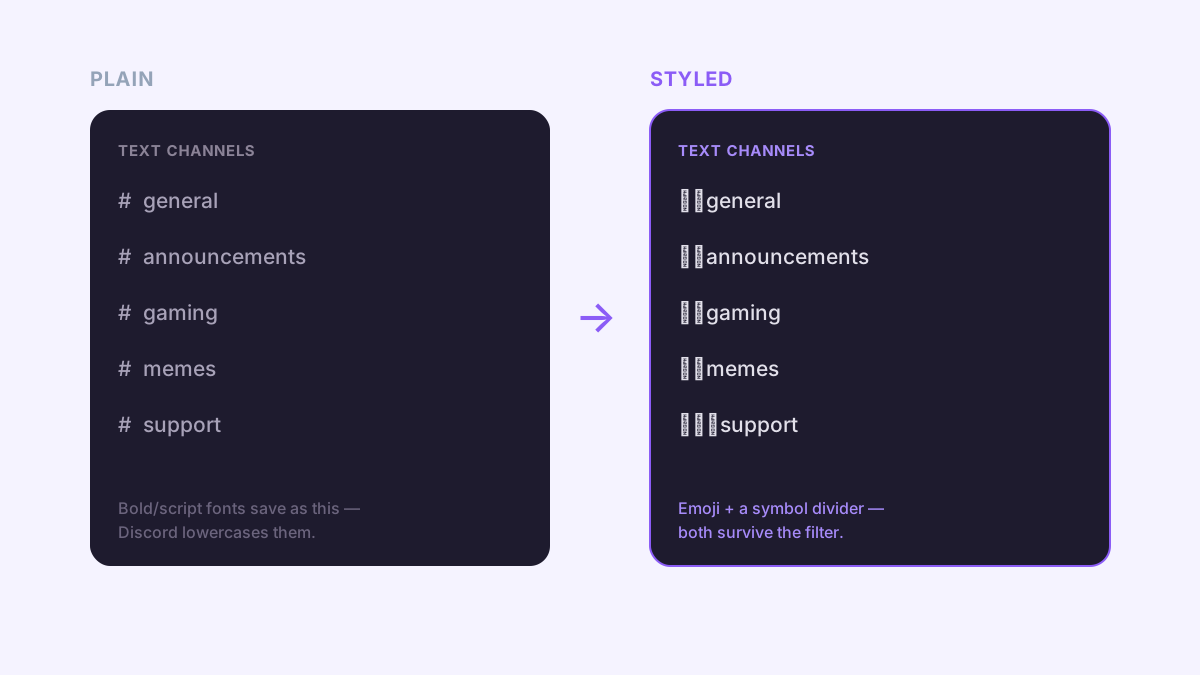
Paste a bold or script font into a Discord channel name and it won't hold. Discord quietly converts it back to plain lowercase letters the moment you hit save. That's not a bug or a settings toggle you're missing — it's how channel names work on Discord, and it trips up a lot of people who just got a fancy font to work perfectly in their username five minutes earlier. Here's why channel names are the one place fonts don't survive, and what to use instead to make your channel list actually stand out.

Why fancy fonts don't work in channel names
A "fancy font" from a generator like ours isn't a font file at all — it's a set of Unicode characters that live in a different part of the character table but happen to look bold, cursive, or bubbly. Your username, server name, and messages all accept those characters as-is, which is why fancy fonts look great there. Channel names are different: Discord runs the text you type through a filter that forces everything to lowercase and swaps spaces for hyphens. Styled Unicode letters get folded back down to their plain lowercase equivalent in that same pass, so "𝐆𝐚𝐦𝐢𝐧𝐠" quietly becomes "gaming" the moment you save.
What Discord channel names actually allow
- Lowercase letters, numbers, hyphens, and underscores — the reliable core that always survives.
- Native emoji, added through the emoji picker or pasted in from your keyboard. Custom server emojis don't work here, only standard system emoji.
- A handful of symbol characters used as dividers, which pass through because they aren't letters that Discord's lowercase filter needs to touch.
- Uppercase letters — automatically converted to lowercase.
- Spaces — automatically converted to hyphens.
- Bold, script, bubble, and other styled Unicode letters — stripped back to plain text.
How to actually make a channel name stand out
1. Add an emoji prefix
This is the single most common way styled channel lists get built, and it's built into Discord itself. Right-click the channel and choose Edit Channel, then tap the emoji icon next to the name field (or just paste an emoji in front of the text) and save. A 📢 in front of "announcements" or a 🎟️ in front of "support-tickets" does more for scannability than any font ever would, because it gives your eye a shape to search for instead of another string of lowercase text.
2. Use symbol dividers instead of a font
Since punctuation and box-drawing characters aren't letters, Discord leaves them alone. That makes them the actual workaround for "styling" a channel name. Safe ones people use often: ┃ ⌇ ・ 〢 ✦ ﹒ 〬. Drop one between an emoji and the name, like 🎮┃gaming or 💬・general-chat, and you get a clean visual break without touching anything Discord will filter out.
3. Keep the whole category consistent
Pick one divider and one emoji style, then reuse them across every channel in a category. Mixing three different dividers reads as messy rather than styled. Keep names short, too — Discord technically allows up to 100 characters, but mobile truncates anything past roughly 20 with an ellipsis, cutting off the part a member actually needed to read.
Where fancy fonts do work on Discord
The restriction is specific to channel and category names — nowhere else. Your server name, your nickname or display name, and every message you send accept full Unicode styling, so a bold or cursive font makes a real difference there. Style your username or your server's welcome message with our Discord font generator, or browse the full set of styles on the fancy font generator and paste whichever one fits.
Test anything unusual on mobile before you commit a whole category to it — a divider that looks clean on desktop can render as a blank box on some phones, and a channel name that isn't obviously readable at a glance stops doing its job.